Magixpro.com: Graphic Tools
Showing posts with label Graphic Tools. Show all posts

Sparkbooth

Sparkbooth is a instant photo booth for your special event. With just a computer and webcam, Sparkbooth makes it easy to create a dynamic party experience. Make DIY photo booth area for you and your guests have a blast taking photos and creating memorable keepsakes. Sparkbooth turns any computer with a webcam into a full screen photo booth kiosk. It includes additional options to automatically send photos to a printer, and/or share photos online on Facebook, Twitter, SmugMug, Flickr, Posterous, tumblr, or other services.

XnView --Manage multimedia files and all possible image formats.


This free program provides a number of helpful tools for working with digital photos. XnView's pane interface shouldn't disorient most users, as it uses a tree-like structure to let you view your shots and browse your music collection.

Picto Selector1.6.7--Search pictos and create pictosheets and daily tasks.


Select from over 20000 pictos and combine them into picto sheets. Fast search options and categories to select from. Create you're own pictos from photo's and text. Create clock and time timer pictos. Use drag and drop to combine pictos into sheets that visualizes daily tasks. Print overlays for Go talk, Supertalker and communication devices. It is available in Dutch, French, English, Spanish, Catalan, German, Danish, Italian, Hungarian, Portuguese and Brazilian Portuguese.

Funny Photo Maker - Have fun with the world!

Funny Photo Maker is free photo editor software providing you with free photo frame, fun picture effects and photo face fun. With this free photo editing program, you can edit gorgeous photos, and output in BMP, JPG, PNG, and GIF animation. Funny Photo Maker has a user-friendly interface that enables you to fast comprehend and use the powerful program. The whole editing process is simplified into 2 steps: Design & Output. No complicated graphic editing knowledge required. This photo editor is a 3-in-one photo editing program includes three kinds of photo editing functions: Artistic, Frame and Face fun. You can design photo as you like with gorgeous photos effects, well-designed photo frames and funny background.

FastPictureViewer 1.9, for 45+ image formats and 400+ digital camera models!

FastPictureViewer Pro (32-Bit) is designed to speed up the workflow of professional photographers and provides full color management including support for custom profiled monitors, rating functions compliant with windows Vista and Adobe XMP standards, instant RGB histogram and EXIF windows, instant magnifier, image pre-loading and caching and optional Direct3D acceleration for ultimate viewing speed on modern computers.

Fresh View 8.38


Fresh View gives you the ability to organize and view multimedia files (images, audio, video). Watch movies, listen to music, and view graphics in a slide show. Image files in a folder can be displayed using a number of views, including a thumbnail view that lets you quickly see what your images are without having to open them.

ManyCam -The best free live studio & webcam effects software!

Many Cam allows you to use your Web cam with multiple programs at the same time. Broadcast your Web cam video simultaneously on MSN Messenger, Yahoo, Skype, AIM, PalTalk, and CamFrog. Manycam also lets you to add cool live computer generated special effects and graphics to your video. 

Transplant your face to any body you want and let your friends share your fun!

Face Off Max, is a image software which allow users to experience photo face shifting or face transformation for fun. This software is creative, bug free and easy to use. It allows you to upload anyone photo, cut and merge their face into other popular stock images. 

Free Screen Magnifier for Windows: Virtual Magnifying Glass 3.5


Virtual Magnifying Glass 3.5, is an open source screen magnifier that allows you to magnify any part of the screen. This free Magnifying software resides in your system tray and works from your system tray. When you launch this screen magnifier, it surrounds your mouse cursor with a rectangle. That rectangle zooms the part of the screen wherever you move your cursor.

How can I protect my images from being stolen, with Watermark ?

In those days watermark is very essential stuff if you are one of those person who struggle a lot to make a good quality photo or image. Publishing photos online we expect them to be seen by our friends and relatives. Nobody wants to see their images used in online advertising or magazine articles. 

Convert Photo to Sketch, Drawing, Painting, B&W

Here is a free image editing software which even allows you to convert photo to sketch in no time. With the help of this image editing  software, you can perform Ink sketch, pencil sketch, and oil painting as well. 

Automatically turn your photos into paintings, drawing and cartoons...

If spend lot of time at Facebook or you just looking for a quality multimedia tool which allows you to create beautiful works of art from your digital photos, for free....then FotoSketcher could be a right option for you. It provides users with a simple tool for re-imagining their photos as handmade drawings. While the program provides easy controls and a lot of flexibility, nobody will mistake the results for actual art.

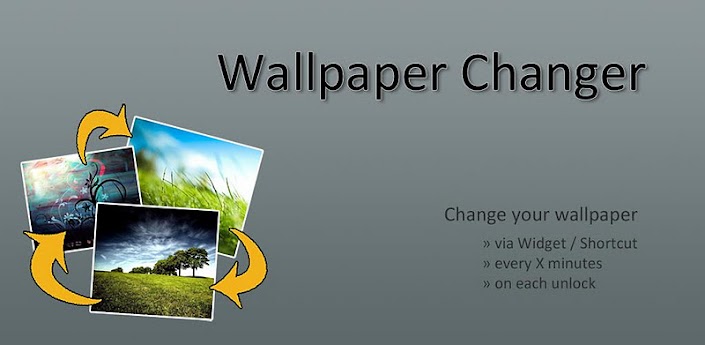
Wallpaper Changer


Change your wallpaper with one click or automatically every X minutes!
This app allows you to quickly change your wallpaper with one single click on a widget!
Additionally, you can enable a timer to automatically change your wallpaper on a predefined time.
Images can easily be added to the rotation list by using the Android Gallery app or a file manager like FileExpert.
This app is optimized for battery life & performance, so it might take some seconds to actually change the wallpaper after a click on the widget!

Features:
- easily add images or even folders through the Android gallery & other file managers
- change wallpaper with a timer, on each lock-screen unlock or through a customizable widget
- 2 widgets: change to next wallpaper in rotation list or select the wallpaper you want to see
- ordered rotation or random wallpaper
- very low memory and battery consumption: doesnt need any background services running and is not implemented live wallpaper
- no ads

SWiSH Max


SWiSH Max has everything you 
need to create stunning fully interactive 
Flash animations. You can create shapes, text, buttons, movie clips, and motion paths. You can also include more than 230 ready-to-use animated effects including explode, vortex, 3D spin, and wave. 


You can create your own effects or make an interactive movie by adding actions to objects. A scripting language allows you to program sophisticated operations into your animations. You can preview your animation inside SWiSH Max without launching a browser or external player, and live editing lets you make changes while the animation is playing. SWiSH Max creates all the files you need to upload to your Web server, or you can generate the HTML code to paste into an existing Web page.


EarthView


EarthView offers a look at the globe in real time. With simple controls and a crystal-clear satellite view, this is a fun addition to any desktop or screensaver.

EarthView's interface is a user-friendly affair that allows you to customize your view of the globe. Controls are unmistakable and fun to tinker with. In addition, there is a Help file for anyone still feeling confused about this basic program. Viewing Earth is not difficult, but choosing which view may be a little more work. The program's controls provide simple access to the entire globe. Clicking a few buttons will easily add or remove clouds from view, as well as show the city lights in parts of the world that are dark from night. You can apply this view as wallpaper or as a screensaver by cycling through various tabs and settings. No matter what you choose, the end result is a sharp image of our Earth from space.

The program provided two special features that allow you to more fully customize the program. Using a slider allows the view to change from the entire planet to a specific continent, which was simple and fun. Additionally, you can adjust how quickly the view is updated, to provide a real-time glimpse of the globe.
You have 14 days to try out the program. With its easy controls and sharp view of the planet, EarthView is a fun program for anyone who wants their head in the clouds.


Business Card Designer

Business Card Designer Software lets you design your own professional and classy business cards easily. Select from more than 5000 business card templates and hundreds of backgrounds Customize with text, 4000+ Graphics, images and more. Use editing tools, arrangement tools and effects to create business cards. Print double-sided business cards with ease. Customize with your logo, images, text and symbol to create stunning business cards.


You can choose from a vast library of Symbols, Images and dynamic shapes. You get high quality pictorial symbols that translate well into printing. Business Card Designer generates High resolution business cards. Import data directly from Excel, TXT, CSV files. Customize the width and height of your Business card to suit your requirements.


Simple interface makes the Business Card Designer extremely easy to use. Either Print out the cards easily on your own printer or get them professionally printed. You can print easily on Avery Papers. With the MS Word Add on, you can easily edit templates in Word.

What's new in this version: Version 5.0 added 1000+ templates and backgrounds. Now, 100% Avery compatible. Added effects - gradient, shadow, blur, emboss and outline, arrangement tools- group/ungroup, lock/hide, coloring tools- color palettes and color picker, auto fill profile information.


CorelDRAW Graphics Suite X6

CorelDRAW Graphics Suite is an impressive collection of powerful design software that can tackle all sorts of design jobs. Included in the package are: CorelDRAW, the main application for vector design and layout; Corel PHOTO-PAINT, for editing and retouching photos, Corel CAPTURE, for screengrabs; ConceptShare, a collaboration service; and the Bitstream Font Navigator. There are also a bevy of smaller utilities such as a bar-code wizard and an app for helping users optimize two-sided printouts.

Professional Graphic Design Software

  • Superior vector illustration & page layout
  • Versatile drawing and tracing tools
  • Professional photo editing-capabilities
  • Powerful website design software

Please Note:
  • Download versions are available immediately.
  • Boxed products are available for pre-order and shipping will begin end of March!
Your credit card will not be charged until your product ships.
With a suite that includes that many programs and features, it's essential to have solid in-program help, and CorelDRAW is loaded with dynamic hints, video product tours, and hands-on project tutorials that will have you designing elements in no time. Expert advice from professional designers walks users through specific practices such as airbrushing logos and creating textile patterns.

The templates for professionals are diverse and presented in a nifty interface that provides all sorts of useful information. You can sort templates by type--such as brochures, posters/signs, business cards, and newsletters--or by industry, although that list was empty except for "Landscaping." The interface also includes a space for accessing your own saved CDT templates, which can be created easily through the File menu.


Whether the CorelDRAW package is worth its price tag is up to each individual consumer, but a full-featured 15-day trial should give users plenty of time to get acquainted with the application. 

It's necessary to register for a free Corel account to use the trial, and each program requires you to click a "Continue Trial" button before launching, but those small annoyances aren't enough to prevent this bountiful design suite from earning a top rating.

CrazyTalk Animator


CrazyTalk Animator is a revolutionary animation suite with all the necessary tools to easily create pro-level animation. CrazyTalk Animator's stage is a 3D layered 2D studio where you can drag and drop actors, props, scenery and images or video directly to the stage for scene setup. Create actors from any photo or illustration and CrazyTalk Animator's innovative Actor Creator wizard. Bring actors to life with automatic facial animation & innovative puppeteering motion.
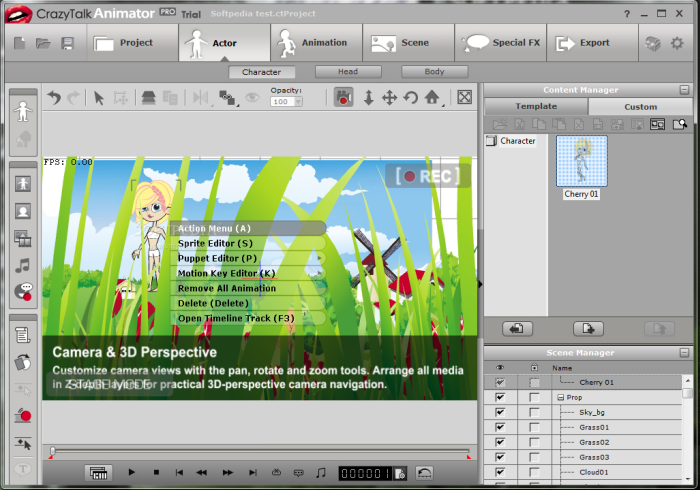

 Drag & drop to build sets with scenery and props. Film and direct all the action with camera & time-line tracks for complete 2D animation.


What's new in this version: Verion 1.11 includes the following improvements:
  • Support for Virtual Machine on Mac.

  • Supersampling in export function. (elimination of jagged/pixelated edges)


What people says: 

1)"CrazyTalk Animator approaches animation from a different perspective, and is a great tool for hobbyists, beginners, or anyone looking to have fun. In the right hands it can offer sophisticated options for producing fully-featured animations."

About.com, February 2011


2) "CrazyTalk Animator PRO rocks!" "This is not just amateurish stick-figure animation. Do you enjoy cartoons like "South Park"? You can create similar works, and maybe pitch a zero-budget show pilot to cable TV. Or just create fun videos to amaze your circle of friends."

Yahoo's Associated Content, February 2011


3) "It offers an easy-to-follow route for beginners, who will really benefit from the tutorials, and a vast array of options and settings for advanced users, who will be able to use it to create exciting animations."

Computeractive, March 2010


XNVIEW V1.98.5

XNVIEW V1.98.5XnView.com - 4.34MB (Non-Commercial Freeware)
XnView is freeware software that allows you to view and convert graphic files. It's very fast and easy to use. But more importantly it supports more than 400 graphics formats.


Features:-

  • Import about 400 graphic file formats
  • Export about 50 graphic file formats
  • Multipage TIFF, Animated GIF, Animated ICO support
  • Image IPTC, EXIF metadata support
  • EXIF auto rotation support
  • IPTC editing
  • Resize, rotate, crop support
  • Lossless rotate & crop (jpeg) support
  • Adjust brightness, contrast...


Twitter Delicious Facebook Digg Stumbleupon Favorites More