Magixpro.com: Mobile
Showing posts with label Mobile. Show all posts

Snaptu 1.7.0

Access Facebook, Picasa, Live Score, Pub reviews, Movie review, RSS reader, Live score, Pub reviews, Journey Planner.....all accessible now through one tiny free application! Sanptu application browser boots your phone with iPhone like user experience.Install Sanptu on your phone to get free access to the web's best online services.

Free Download MobiShield (Android) 4.0.1 ---Protect Your Smartphone

MobiShield anti-virus provides complete protection against viruses, malware and spyware. It protects your smartphone by running in the background of your phone in real time.

How to transfer Music from iPod to Computer ?


If you recently had to replace your computer or reinstalled your operating system, you may have encountered a certain problem when connecting your iPod, iPhone or iPad:- iTunes contains none of your music, playlists or videos and might even try to format your device! Luckily, TouchCopy can help you overcome this and can quickly and safely transfer all your music and video back to iTunes.
Using TouchCopy will ensure that your iPod data stays safe – TouchCopy will prevent iTunes from syncing your iPod, iPhone or iPad while it's running. With just a few mouse clicks and within minutes, you can get all your content back safely.
TouchCopy enables you to copy your iPod, iPhone and iPad music to your PC or Mac hard drive. You can even transfer your music, playlists and video straight to iTunes, including all your song data, your ratings, play counts and album art. TouchCopy will also transfer any other audio content on your iPod, iPhone or iPad like your Podcasts, Audiobooks and iPhone ringtones.
If you like keep a backup of all your audio and video content, TouchCopy can do this for you very easily too. At the touch of a button, you can backup your iPod, iPhone or iPad to your PC or Mac hard disk, external hard drive or into iTunes.

How to Access the wallet on your Phone ?


Mobile banking allows you to conduct financial transaction on your phone just as you would at your bank branch or through net banking.Bank are now evolving this facility as they launch innovative products.


To register for mobile banking service, you will need...
  • An Account with the concerned bank or telecom company. You should be register for Net banking in case of a Bank
  • A java enabled Cell Phone for Mobile Banking, but an ordinary phone will do for airtel money
  • An active GPRS connection in case of Mobile Banking so that you can access the net, to download the mobile banking application
To transfer funds, you will have to....
  • Log In to the bank's App menu and input the mobile phone number or bank account number of the beneficiary.
  • Message the PIN you receive from the bank to the beneficiary who will also receive a secret number. He will have to Log In both PINs at the ATM to withdraw the Money. If the funds are being transferred to a Bank Account, It will take about four working days.
Thank You, TOI

Samsung Galaxy Player 3.6

An inexpensive alternative to an Android smartphone, the Samsung Galaxy Player 3.6 ($149.99 list, 8GB) acquits itself well as a basic, budget MP3 and video player that also runs most of the 400,000 Android apps available. It's for people who want to play "Draw Something" but don't want to deal a smartphone contract, and it costs $50 less than the same-capacity iPod touch ($199, 5 stars). But its low-res screen may limit its appeal to status-conscious teens who could make up its core market. 

Physical Design and Networking
The Galaxy Player 3.6 (Best Deal: $149.99 at Amazon) looks like a small budget smartphone. Made of black and chrome plastic, it has standard MicroUSB and headphone jacks on the bottom panel and a matte back. The front is mostly a somewhat-dim 3.6-inch, 480-by-320 LCD screen with three standard Android touch buttons below it. At 4.6 by 2.6 by .4 inches (HWD) and 4.2 ounces, it'll fit easily into any hand and most pockets.

Here's the thing about the screen. Yes, it's the same resolution as many low-cost smartphones. But remember that we're competing with the Apple iPod touch here. Because of the touch's dominance in this category, there are different expectations for media players than for phones, and this screen is noticeably dimmer and grainier than that of the iPod touch. In a row of iPods, the Galaxy Player 3.6 will stand out in an unattractive way. That's why we're more likely to recommend the larger-screen Galaxy Player 4.2, whose 800-by-480 screen stands up better against its top competitor. 
The Galaxy Player uses its Bluetooth connection to pull off a neat trick: The handheld can act as a Bluetooth headset for a simpler phone you have lying around. When it's connected to your phone, you can answer calls on the Galaxy Player as if it was a smartphone. You can also dial from the Galaxy Player's contacts book, though there's no traditional dialer, and no easy way to activate voice dialing. The Player doesn't share your phone's Internet connection over Bluetooth. To get on the Web, you'll need a Wi-Fi connection; we had no problem connecting the Galaxy Player to our 802.11n network.
The relatively dim screen and lack of phone capability make for great battery life; we got 8 hours, 15 minutes of full-brightness video playback time on a charge, compared to five and a half hours on an iPod touch with its screen brightness set to full and eight hours with the iPod touch's brightness set to half.


The included earphones come with a microphone, and clear rubber flanges that create a bit of a seal within the ear to improve sound and provide some very basic passive noise cancellation. You should still look at upgrading, but this pair is better than the signature white earbuds that come with the iPod touch.
PerformanceBuilt around a 1GHz, single-core Cortex-A8 processor, the CPU is the same as you'll find in many inexpensive-to-midrange smartphones. It runs Android 2.3, with no real hope of an upgrade to 4.0. It was undistinguished at benchmarks, but performed well overall because of the low-res screen. With fewer pixels to push, the processor doesn't have to work as hard as it does with higher-resolution devices.
Casual games like Angry Birds and Draw Something performed well. Web browsing will feel cramped if you're used to the now-more-common larger 800-by-480 screens, but at least the Galaxy Player supports Flash 11. 
Along with the standard Google Play market, the Galaxy Player comes with the Samsung Apps store, a selection of mostly free apps curated by Samsung. Proprietary Samsung apps let the Galaxy Player be used as a remote viewfinder for Samsung Wi-Fi-enabled cameras, or as a remote control for Samsung Wi-Fi-enabled TVs. 
There's 8GB of on-board memory as well as a MicroSD card slot that you must remove the battery to use. Our 64GB SanDisk MicroSD card worked fine, so you can get quite a lot of media onto this device. The Player handled AAC, WMA, MP3 and OGG format music files at a range of bit rates, and played MPEG4. H.264 and WMV video files at up to 640-by-480 resolution without any issues. The Player has a moderately loud, single speaker that delivers undistinguished, but not awfully distorted sound loud enough for a small bedroom; you can also use wired or Bluetooth headphones.
The low-resolution screen doesn't bring video to life the way the iPod Touch screen does, but it's adequate for TV shows and cartoons. Netflix, TV.com and Vevo apps work. The Hulu app said it does not support this device.
The FM radio works when headphones are plugged into the 3.5mm jack. It automatically scans for stations, which is very convenient. I found that it locked into stations easily and played them clearly.
There's a 2-megapixel camera on the back of the Galaxy Player 3.6 and a VGA camera on the front, but don't expect much of either of them. The rear camera takes slightly hazy, very contrasty pictures with some low-light blur and in one case, rather odd fish-eye distortion. The front camera is for taking basic snapshots of your face. You can record unremarkable 640-by-480 videos at 25 frames per second with the rear camera; there's no flash.


Pros
Inexpensive. Solidly built. Runs Android apps.

Cons
Low-res screen.

Bottom Line
A budget smartphone without the phone, this low-cost media player should appeal to casual gamers and music listeners.

NFC-enabled Lumia 610 :NOKIA


Nokia and Microsoft are jointly jumping onto the NFC bandwagon with the next version of the Lumia 610.
Slated to debut in Europe sometime this summer, the new version of the 610 will be the first Windows Phone handset to let users pay for goods on the go via NFC. The phone has already been certified for use with both MasterCard's PayPass and Visa PayWave, according to Nokia.


European carrier Orange will be the first provider to offer the NFC-enabled 610, which will be able to read NFC tags at the point of sale and pair with other NFC accessories.
Moving beyond just mobile payments, the phone will be able to use NFC as an alternative to Bluetooth by communicating with other devices around the home. As one example, the 610 could tap into NFC to pipe music to Nokia's wireless Play 360 speakers.
"Nokia continues to lead the field in NFC with this latest implementation on the Windows Phone platform, in which we have the full support of Orange," Ilari Nurmi, head of product marketing for Nokia's Smart Devices business unit," said in a statemdent. "We're bringing NFC right across our portfolio, and together with our ever-growing range of NFC accessories we're making it easy for people to connect via a single tap. We're also enabling operators and other service providers to build NFC payment and ticketing solutions on top of our smartphones."
This is hardly Nokia's first foray into NFC. The Finnish handset maker has been equipping itsSymbian phones with the mobile payments technology. But it is a first for Microsoft's mobile OS, with the 610 the first NFC-equipped Windows Phone handset, courtesy of Nokia.
Though years in the making, NFC has been slow to ramp up, especially in the United States. Businesses, banks, phone makers, and carriers have all been trying to work together to push the technology and convince consumers of its ease of use. Google already offers NFC in a few of its smartphones. But until more major devices (ahem, the iPhone) support the technology, its adoption will likely move ahead slowly.
Still, the move could pay off for Nokia and Microsoft, which need to distinguish the Lumia lineup from the competition if they expect to make any headway in the mobile marketplace.

Mobile Malware & Your Smartphone


While Jeff Schmidt, the CEO of JAS Global Advisors, was surfing the Web on his new Android smartphone (his first Android phone) earlier this year, what appeared to be an ad popped up on his screen. The "ad" looked like the prompt that appears when his phone rings. He clicked the button on the ad to pick up the putative call, and the ad began downloading a binary file--malware--onto his Android phone. Schmidt had been hit by a drive-by download, a program that automatically installs malicious software on end-users' computers--and increasingly, smartphones--without them knowing. 
How Drive-By Downloads Work on Your Smartphone
Attackers are adapting the popular and effective drive-by download method, popularized on PCs, for mobile devices, says Kevin Johnson, founder of information security consultancy Secure Ideas and author of Security 542: Web Application Penetration Testing and Ethical Hacking.
Drive-by downloads work by exploiting vulnerabilities in Web browsers, plug-ins or other components that work within browsers. Through a browser vulnerability, drive-by downloads dump an application onto the user's computer, such as fake anti-virus software--malware that's masked as anti-virus software.
On a smartphone, drive-by downloads work differently, says Johnson, who is also a senior instructor with the SANS Technology Institute. "With an iPhone, I can't browse to a Website and have it install an app on my iPhone. The iPhone is not capable of doing that, which is good," he says. "The problem is that the drive-by download model has changed to take that into account."
So instead of dumping an app onto your smartphone's OS, the infected Website exploits a vulnerability in, say, the Safari browser and runs commands or packages within the phone's operating system to change the way it works, says Johnson.
"It's not installing the software, but it's still doing bad stuff to the phone," he adds. "It's considered jail-breaking or rooting the device."
How to Protect Your Smartphone
IT departments can lock down corporate-owned smartphones so that employees can't install anything on them or browse to random Websites. Securing employee-owned smartphones is obviously a lot more difficult. Johnson says companies need to emphasize awareness and make employees understand security risks. He also recommends mobile device management systems that restrict certain user activity.
One such mobile device management solution for "Bring Your Own Device" environments comes from Good Technology. Good Technology offers an application that smartphone owners can install on their devices, says Johnson. The software serves as a container for work-related activity on the phone. It basically separates the corporate work from the rest of the phone, says Johnson.
When an employee is ready to get onto the corporate network to check email or product inventory, for example, he simply launches the Good application, which prompts him to authenticate. "Everything that happens inside that app is segmented from the rest of the phone," says Johnson. "As the app is running, everything is there in memory. When you close the app, it saves everything else to a file that is encrypted. Attackers can't get to it. So if a drive-by download attacks a phone, it can't access any of the corporate stuff. It doesn't protect the device; it protects a company from an infected device."

GSM-Tracker, Now Locate your current geographical location using your mobile phone

GSM-Tracker user tracker allows you to track the location of your friends that are signed up with the free GSM based location service at, www.gsm-tracker.com, and have enabled their location info to be publicly displayed. If you friend is using the gsm-tracker.com service on his mobile phone, and has enabled his location to be viewed publicly, simply ask him for his phone's IMEI number, and enter it in the preferences dialog. By default, my IMEI number is entered so you can see how the Widget is working.


NOTE:  We suggesting you to visit, GSM-Tracker  Website (http://www.gsm-tracker.com)to know how does GSM-Tracker Works.


GSM-Tracker works with the following mobile phones :

Symbian Series 60 (1st and 2nd edition), Symbian Series 80 , Windows Mobile Smartphones 


The manual process of tracking a lost/stolen mobile phone is as follows:
Firstly, you must lodge an FIR in the nearest police station giving details of the incident. FIR is lodged only in the case of ‘Stolen phones’.  (In case of ‘lost’ cell phone, the police would note down the complaint on a simple paper and provide you with its copy after signing it. This signed complaint may be used instead of an FIR for further process.)
Take the copy of the FIR to your service provider (i.e. your sim-card’s company). You can go to an outlet authorized by the company. The service provider will lock the sim so that no one else can use the sim issued in your name.
In tracking the handset IMEI number is utmost essential. With the help of your IMEI number the service provider tracks the lost/stolen mobile handset and gives you the current location of your handset.
The follow-up is taken up by the police authorities.
If everything goes the way it should then definitely you will get back your lost/stolen handset!

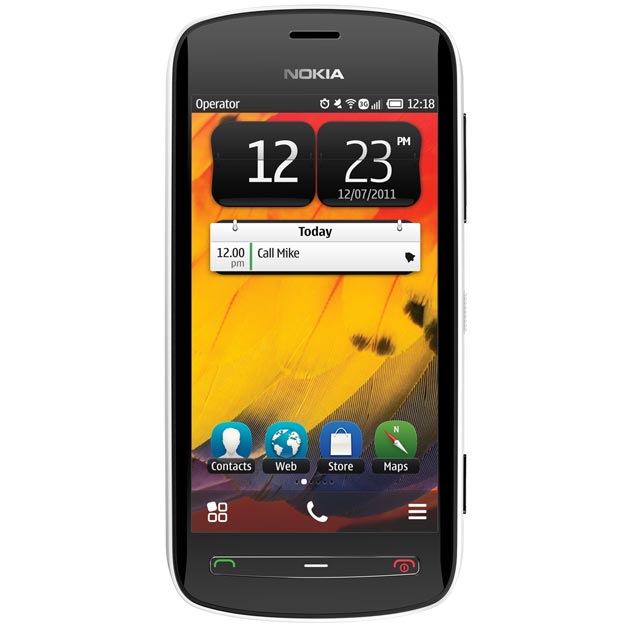
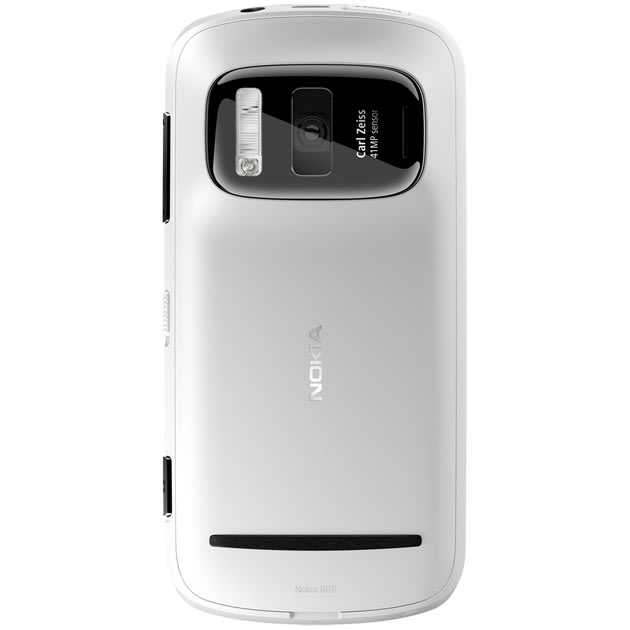
41-MP camera smartphone

At the Mobile World Congress in Barcelona, Nokia announced the 808 Pureview, a flagship Symbian device with a 41-megapixel camera. In addition to superior still imaging technology, the Nokia 808 PureView, also includes full HD 1080p video recording and playback with 4X loss less zoom and the world's first use of Nokia Rich Recording.


The new smartphone, which was announced at the Mobile World Congress in Barcelona, is expected to launch in Europe in May, The Telegraph reports.
With 41 MP, the phone is able to shoot images that Nokia claims can be printed in "poster size".
Files, however, condense four or five pixels into one, and Nokia claims they are smaller than equivalent products from rivals.
A Carl Zeiss lens shoots in continuous focus HD video, at 1080p.
Mary McDowell, the firm's executive vice president for mobile phones, said the company's engineers had been working on the product "for years".
She said it was "natural" to assume that its technology would be used in other Nokia products in the future.
McDowell added that while the device was larger than its rivals, it was still sized to fit in pockets, rather than replace a full-size camera.
According to the report, the device uses a 1.3GHz processor, comes with 16GB of storage and runs a 4" screen at 360 x 640, which is below HD resolution.

Protect your mobile device


The need to secure something personal and important to us is a natural instinct. Yet that instinct doesn't naturally extend over to a device that’s increasingly becoming the center of our attention: the smartphone. A general lack of awareness and an attitude confined to the PC era is to blame.
If you are the last one to leave your house, do you not bolt and lock the front door? Don’t you safeguard your laptop or desktop PC with an antivirus software? Why then do you leave your smartphone in the lurch?
For a country with close to a billion telephone subscribers, of which a substantial chunk is attributed to mobile subscribers, without security software on our smartphones, we are all sitting ducks exposed to ruthless hunters smack in the middle of hunting season. It’s a game you can’t win. Sooner or later you will hit a poisoned link on your smartphone’s web browser, or unsuspectingly download a malware ridden attachment on to your phone and get enmeshed into a sophisticated botnet. It’s only a matter of time, given the rapid rate at which smartphones and tablets are being launched and introduced into our complex lives.
Android, the fastest growing mobile OS in terms of market share, is the most targetted OS since mid-2011, according to a security report. Since 2009, the number of malware targetted at Android has grown by a whopping 400%. What’s more, since Google doesn’t police and screen the apps added into the Android Market, you (and Google) have no way of knowing whether that cool, new app with multiple recommendations is infected with a trojan or not. Chances are that unless you suspect fishy behaviour and report the app for Google to check, the malware app will just fly under the radar and continue to exist as a legitimate download option on the Market. Other mobile OSes may be lesser at risk compared to Android, but they aren’t 100% safe without security software. Sad but true.
The scariest news of all is that malware makers have recognized the sheer scale of opportunity and incentive in targeting mobile devices, especially when awareness levels of potential hazards among smartphone users is at such a record low. Security experts are unanimous in their opinion that 2012 will be a breakthrough year for malware scams on smartphones. James Lyne, director of technology strategies at Sophos, believes that we are only at the beginning of this wave of malware attacks targeted on smartphones.
The potential risks of having your smartphone exposed to a scam/malware attack are greater than you ever imagined. For we are not only carrying a substantial portion of our identity and personal files (photos, videos, etc.) on our smart devices, but sensitive work documents, business intelligence and corporate data is equally at risk due to the growing acceptability and increasing complexity of monitoring and securing an armada of different smartphones at work places -- it’s an IT manager’s worst nightmare.
Hence, most of the times, the onus is on us individual users to secure our smartphones to safeguard our personal and professional data. There’s no dearth of suitable software, if you know what to look for either. There’s a bunch of free antivirus apps to choose from on the Android Market or any app store specific to your smartphone’s OS. Since paid subscriptions to most popular security apps only cost about Rs. 500 or so, securing your smartphone is quite cheaper than your PC. The peace of mind ensured by having an antivirus app running on your smartphone is worth the trouble of hunting it down and installing it on your mobile device.
I totally understand that coding and spreading a malware on smartphones is substantially difficult than attacking Windows PCs, but the threat persists and by all indications it’s only going to rise. So do yourself a favour and protect that smartphone.

Twitter Delicious Facebook Digg Stumbleupon Favorites More